Free Grammar Checker vs Grammarly: Honest Comparison
Most "Grammarly vs free checker" articles are lists of five alternatives with a paragraph each, written to rank rather than to actually answer the question. This one doesn't do that. It's a direct, feature-by-feature comparison between a free grammar checker and Grammarly, so you can see exactly where they match, where they diverge, and where the $12–$30-a-month price tag is — or isn't — buying you something real. If you'd rather skip ahead and try it on your own writing, the full set of tools is on the WriteBotics homepage.
The Comparison, Feature by Feature
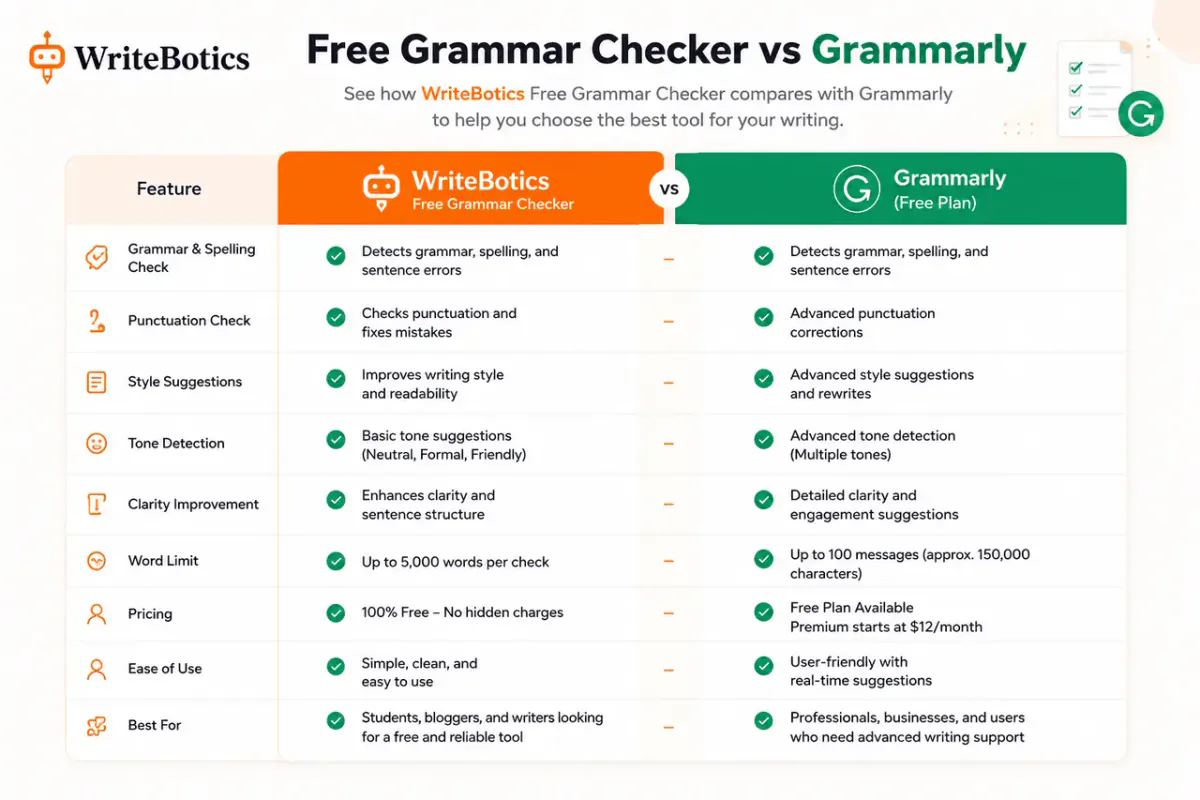
| Feature | Free grammar checker | Grammarly (paid tier) |
|---|---|---|
| Spelling & basic grammar | Yes | Yes |
| Punctuation fixes | Yes | Yes |
| Contextual word-choice errors (e.g., "their" vs. "there" used correctly by grammar but wrong in context) | Partial — varies by tool | Yes |
| Full sentence rewrites | Limited or none | Yes |
| Tone detection | Rare | Yes |
| Plagiarism scanning | Usually a separate tool | Bundled in paid tiers |
| Word/character limits | Often none, or generous | Prompt-based credit limits, even on paid plans |
| Price | $0 | Roughly $12–$30/month depending on plan and billing cycle |
The honest read of this table: free tools have closed most of the basic-error gap. Spelling, punctuation, and standard grammar rules are largely solved problems — a free checker and Grammarly will both catch a comma splice. Where Grammarly still separates itself is in judgment calls: rewriting an awkward sentence, adjusting tone for an audience, and flagging a word that's spelled correctly but wrong for the context. That's a narrower gap than it used to be, but it isn't zero.
What "Accuracy" Actually Means Here
Grammar checkers get compared on "accuracy" a lot, but that word covers two very different skills worth separating:
- Rule-based accuracy — catching things with a definite right answer: subject-verb agreement, a missing apostrophe, a run-on sentence. Both free and paid tools handle this reliably now; it's largely a solved problem.
- Judgment-based accuracy — catching things that depend on context: a technically correct sentence that reads awkwardly, a word that's spelled right but is the wrong word for the sentence, a tone that doesn't match the audience. This is where paid tools, with more sophisticated models behind them, still tend to outperform simpler free checkers.
A quick way to test this yourself: paste a sentence like "Their going to loose the game if they dont focus," into any checker — every tool, free or paid, should catch all three errors. Now try something like "The report was wrote by the team last quarter" — a subtler grammatical error that some rule-based free checkers miss because it doesn't trip an obvious pattern. Running a few of your own real sentences through both types of tools tells you more about the actual gap than any spec sheet will.
The Limits Every Grammar Checker Shares
Regardless of which one you use, it's worth being clear-eyed about what no grammar checker — free or paid — actually does:
- It won't catch factual errors. A grammatically perfect sentence can still state something untrue.
- It won't catch logical gaps. An argument that doesn't hold together will pass a grammar check just fine.
- It won't replace a second pair of eyes. For anything with real stakes — a job application, a client proposal, a published article — a human read-through still catches things no automated tool does.
Treating any grammar checker as a full editing solution, rather than one layer of it, is the most common way writers end up disappointed by a tool that was doing exactly what it promised.
Where a Free Grammar Checker Genuinely Holds Up
Catching what actually causes embarrassment. The typos and grammar slips that make writing look careless — missing words, subject-verb disagreement, comma errors — are caught reliably by free tools now. This is most of what a casual writer or student actually needs day to day.
No credit or prompt limits to manage. A lot of paid tools, Grammarly included, have shifted toward prompt-based limits even on paid plans. A straightforward free checker like WriteBotics' Grammar Checker sidesteps that entirely — check as much text as you need without tracking a monthly allowance.
Good enough for high-volume, low-stakes writing. Internal notes, social captions, first-draft blog posts — content where a missed nuance isn't costly. Paying for advanced tone and rewrite features here is often solving a problem you don't have.
Where Grammarly's Paid Tier Still Earns Its Price
Full sentence rewrites, not just flags. A free checker tells you a sentence is awkward. Grammarly's paid tier often rewrites it for you, which saves real time on long documents.
Tone consistency across a long piece. For client-facing writing — proposals, cold emails, executive reports — knowing your tone reads as "confident" rather than "aggressive" before you hit send is a genuinely useful check that most free tools don't attempt.
Non-native English fluency suggestions. This is the use case reviewers across the board tend to agree on: writers working in a second language get real value from suggestions that catch phrasing that's grammatically fine but doesn't sound natural — something rule-based free checkers are less consistent at.
One less tool to manage. Bundled plagiarism scanning means one subscription instead of two separate tools, which some writers will genuinely prefer even if the individual features are matched by free options elsewhere.
What This Isn't: A Verdict That Applies to Everyone
The honest answer to "which one should I use" depends on what you're actually doing:
- Students and casual writers: A free grammar checker plus a separate Plagiarism Checker covers the vast majority of what you need, at no cost.
- Bloggers and content writers: Free tools handle day-to-day drafts fine. If your prose needs more polish than a rule-based checker gives, that's where paid rewrite features start to earn their cost.
- Non-native English professionals: This is the group most reviewers agree benefits most from a paid tool's fluency suggestions — the value is real here, not just marketing.
- High-volume professional writers (5,000+ words/day): Credit and prompt limits on free tools — and sometimes on paid ones too — become the actual bottleneck, not accuracy. Check the specific limits before committing either way.
A Word on "Best Of" Lists (Including This One)
A lot of grammar-checker comparisons online are written by sites earning a commission when you click through to the paid option — which doesn't make the recommendation wrong, but it's worth knowing when you're weighing "honest" advice against an incentive to steer you toward the pricier tool. The more useful question isn't "which tool wins" in the abstract — it's whether the specific features you're missing (rewrites, tone, fluency suggestions) are ones you'd actually use enough to justify a subscription. If you're not sure, that's a good sign to start free and upgrade only if you hit a real limitation.
Frequently Asked Questions
Is a free grammar checker as accurate as Grammarly for basic errors?
For spelling, punctuation, and standard grammar rules, largely yes. The gap shows up mostly in tone suggestions and full sentence rewrites, not in catching a misplaced comma.
Do I need to pay for plagiarism checking?
Not necessarily. Many writers use a free grammar checker alongside a separate free plagiarism tool rather than paying for a bundled subscription.
Will a grammar checker catch every mistake?
No tool does. Grammar checkers, free or paid, can miss a correctly spelled word used in the wrong context or a factual error. A final human read-through still matters.
Is Grammarly worth it for students?
Usually not the paid tier, unless the fluency or rewrite features solve a specific problem you're actually running into. The free tier plus a plagiarism checker covers most academic needs.
Can I switch between free and paid tools without losing work?
Yes — grammar checkers analyze text you paste or type; they don't lock your writing into their platform. Switching tools is as simple as trying a different one on your next draft.
Does a free grammar checker work for professional or business writing?
For most day-to-day business writing — emails, internal docs, reports — yes. The gap widens for client-facing or high-stakes writing where tone consistency and nuanced rewrites matter more, which is where a paid tool's judgment-based features tend to pull ahead.
Try It Yourself
Run a real paragraph through the Grammar Checker and see how it handles your actual writing, then pair it with the Plagiarism Checker if originality matters for what you're publishing. If you want a broader look at where free tools stand against Grammarly across more alternatives, see our earlier guide, Free Grammar Checker vs Grammarly: Is It Worth Paying? For more on how Grammarly's own AI features can sometimes trigger AI-detection tools, see Why Does Grammarly Flag My Writing as AI-Generated? The full toolkit is available on the WriteBotics homepage.