In the rapidly evolving landscape of 2026, the way we write has fundamentally shifted. We are no longer just fighting against typos and misplaced commas; we are navigating a world of AI-augmented communication where "perfect" writing is the baseline, not the exception. For years, Grammarly has been the undisputed king of this domain. However, with the explosion of Large Language Models (LLMs) and built-in operating system writing tools, the question has become more pressing than ever: Is Grammarly Premium still worth the investment, or can a free grammar checker do the job just as well
This guide dives deep into the battle between free grammar checkers vs. Grammarly, exploring the features, the costs, and the best free alternatives available in 2026 to help you decide where to put your money—or if you should keep it in your pocket.
The Evolution of Grammar Checking in 2026
To understand the value proposition of a paid service today, we have to look at how far free tools have come. In 2026, a Free Grammar Checker is no longer a simple spell-check plugin. Most free tools now leverage sophisticated neural networks that understand context, nuance, and even emotional resonance.
Grammarly, meanwhile, has transformed from a "red underline" tool into a full-scale AI writing partner. But as free competitors like LanguageTool, QuillBot, and even built-in AI like Apple Intelligence and Microsoft Copilot offer high-level corrections for $0, Grammarly's $12–$30 per month price tag faces intense scrutiny.
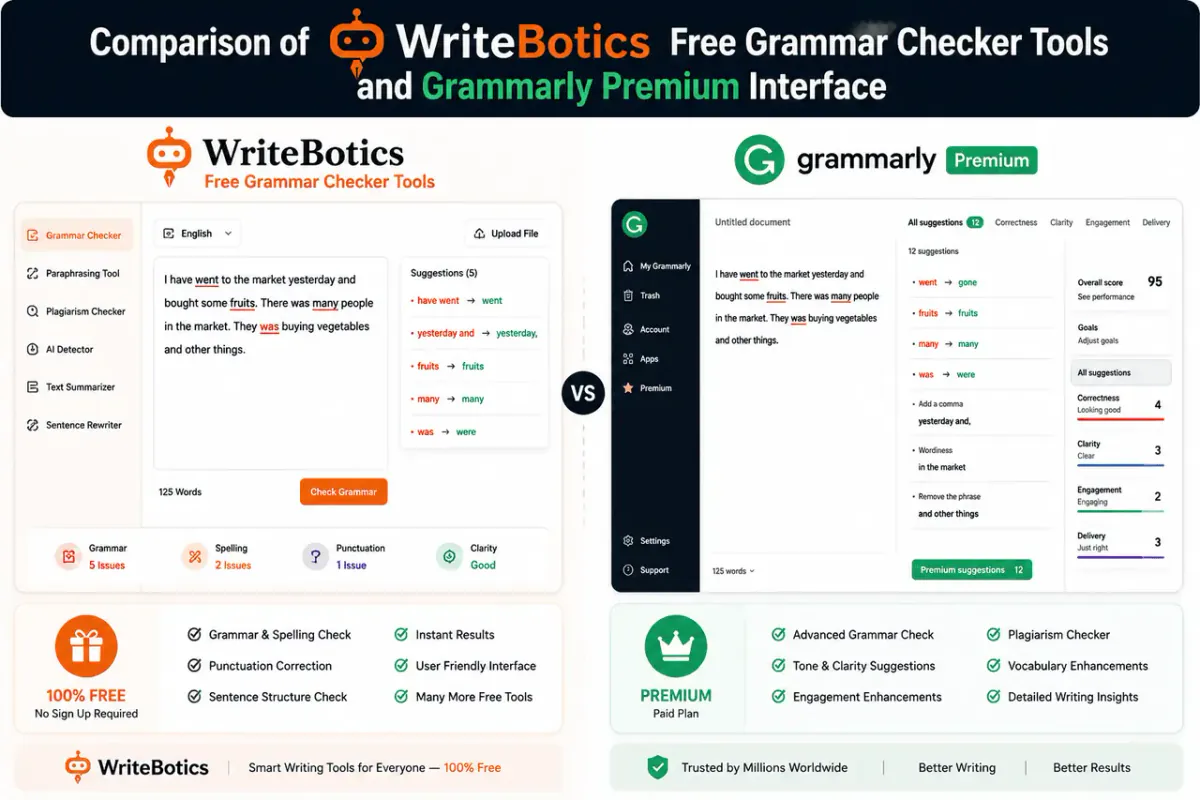
Grammarly Free vs. Grammarly Premium: What’s the Gap?
Before looking at alternatives, we must understand what you actually get when you upgrade within the Grammarly ecosystem.
The Free Version
Grammarly’s free tier remains one of the most robust on the market. It covers:
- Critical Grammar and Spelling: Catches typos that standard word processors miss.
- Punctuation: Fixes basic comma splices and missing periods.
- Conciseness: Identifies some wordy sentences.
- Tone Detection: Tells you how you sound (e.g., "Formal," "Optimistic"), though it won't help you change it.
The Premium Version
The paid version moves beyond "correctness" and into "effectiveness." Key features include:
- Full Sentence Rewrites: If a sentence is clunky, it offers a total AI-driven overhaul.
- Tone Adjustments: Automatically rewrites text to be more confident, polite, or professional.
- Plagiarism Checker: Scans billions of web pages to ensure originality (crucial for students and SEO writers).
- Vocabulary Enhancement: Suggests synonyms to avoid repetitive language.
- English Fluency: Tailored suggestions for non-native speakers to sound more natural.
Top 5 Free Grammarly Alternatives in 2026
If you’re looking for the best free grammar checker 2026 has to offer, you aren’t limited to just one option. Here are the top contenders that provide premium-level features without the subscription fee.
1. LanguageTool (The Best All-Rounder)
LanguageTool is the strongest *Grammarly alternative free users can find today. It is open-source and supports over 30 languages, making it superior for multilingual writers. Its "Picky Mode" has become incredibly sophisticated, rivaling paid style checkers by identifying overused phrases and complex tautologies.
2. QuillBot (The Best for Paraphrasing)
While Grammarly focuses on fixing what you wrote, QuillBot focuses on how you wrote it. The free version includes a powerful paraphraser and a grammar checker that is surprisingly fast. It’s the go-to tool for students trying to fix the "flow" of an essay.
3. ProWritingAid (The Creative Writer’s Choice)
ProWritingAid offers a very generous free tier for those who write long-form content. It provides "Summary Reports" that analyze your writing for overused words and pacing. Their 2026 AI "Critique" feature now provides feedback on story structure, something Grammarly still struggles with.
4. Hemingway Editor (The Best for Clarity)
Hemingway isn't a traditional grammar checker; it's a "style" checker. It highlights passive voice and complex sentences. It’s entirely free to use in its web-based version and is best for bloggers who need to make their writing "punchy."
5. Microsoft Copilot & Google Gemini
In 2026, the built-in AI in Google Docs or Microsoft Word now performs "contextual editing." You can highlight a paragraph and ask the AI to "make this more professional." This effectively replaces the need for a third-party grammar plugin for many users.
The AI Credit System: A New 2026 Reality
One major change in 2026 is how free tools limit users. Instead of blocking features, many now use a "Credit" or "Prompt" system.
- Grammarly Free: Gives you 100 AI prompts per month for rewriting.
- Free Alternatives: Tools like QuillBot or Wordtune may give you 10 "rewrites" per day.
- The Paid Advantage: When you pay for Grammarly Premium, you are essentially buying "unlimited" AI brainpower. For power users writing 5,000+ words a day, the free tiers will run out of "intelligence" by lunch.
Privacy and Data: The Hidden Cost of "Free"
When debating free grammar checker vs. Grammarly, many users forget to consider privacy. In 2026, data is the new currency.
Many free tools earn revenue by using your writing data to train their AI models. Grammarly has a relatively robust privacy policy for its paid users, often offering an "opt-out" for data training. Some free tools, especially those that are obscure or "ad-supported," may not be as careful with your sensitive company data. Always check the settings to see if you can disable "data sharing."
Frequently Asked Questions (FAQs)
1. Is there a truly 100% free grammar checker with no limits?
Most tools have a "freemium" model. However, LanguageTool and Hemingway Editor (Web) are the closest to being truly free. LanguageTool offers extensive grammar checking without a word count limit, though some "advanced" style suggestions are locked behind a paywall.
2. Can I use ChatGPT instead of Grammarly Premium?
Yes. In 2026, many writers use a "Free Grammar Checker" for real-time typos and then paste their final draft into ChatGPT or Claude with the prompt: "Proofread this for flow, tone, and grammar." This effectively gives you Premium-level editing for free, though it adds an extra step to your workflow.
3. Does the free version of Grammarly check for plagiarism?
No. Grammarly’s plagiarism checker is strictly a Premium feature. If you need a grammarly alternative free for plagiarism, you might try SearchEngineReports or DupliChecker, though they are less accurate and often cluttered with ads.
4. Which is the best free grammar checker for 2026 for students?
QuillBot is generally considered the best for students because its free paraphrasing tool helps rewrite awkward sentences in academic papers. LanguageTool is a close second due to its support for APA and MLA style nuances.
5. Is Grammarly Premium worth it for non-native English speakers?
Yes. This is the one group where the investment almost always pays off. The "English Fluency" suggestions in the paid version catch "unnatural" phrasing that most free tools miss. It helps non-native speakers sound like local professionals rather than just "technically correct" writers.
6. Will using a grammar checker count as "AI Cheating" in school?
Standard grammar and spelling checks are generally accepted. However, using the "AI Rewrite" features in Grammarly Premium or QuillBot can sometimes trigger AI detection software. Always check your institution's specific AI policy before using "Full Sentence Rewrites."
7. Does Grammarly work offline?
No, Grammarly requires an internet connection to access its AI cloud for suggestions. If you need an offline best free grammar checker 2026, look into the desktop version of LanguageTool, which offers some offline capabilities.
8. How do I cancel Grammarly if I find a free alternative I like?
You can cancel via your account settings under "Subscription." It’s important to note that Grammarly does not typically offer pro-rated refunds, so it is best to cancel near the end of your billing cycle.
Final Verdict: Is It Worth It?
So, is Grammarly Premium worth it in 2026?
No, for the average user. If you are a student on a budget, a casual writer, or a general office worker, the combination of LanguageTool for grammar and ChatGPT/Copilot for stylistic rewrites provides a "pro-level" experience for zero dollars. The best free grammar checker 2026 landscape is so competitive that paying $144+ a year is no longer a necessity for basic writing help.
Yes, for the "High-Stakes" Professional. Grammarly Premium remains worth it for individuals whose reputation depends on the nuance of their prose—think lawyers, high-level marketers, and non-native English speakers in executive roles. The seamless integration across all apps (Word, Slack, Email, Browser) and the sheer speed of its AI-style suggestions provide a level of "frictionless" quality control that free tools haven't quite mastered.
Summary Recommendation:
- Start with LanguageTool: Install the extension for the best free grammar checking.
- Use Hemingway Editor: For making your blog posts and emails "punchy."
- Leverage your OS: Explore the built-in AI writing tools in Windows 11/12 or macOS.
- Only upgrade to Grammarly: If you find yourself constantly needing a plagiarism checker or if you write so much that you exhaust the free AI credits of other tools.